
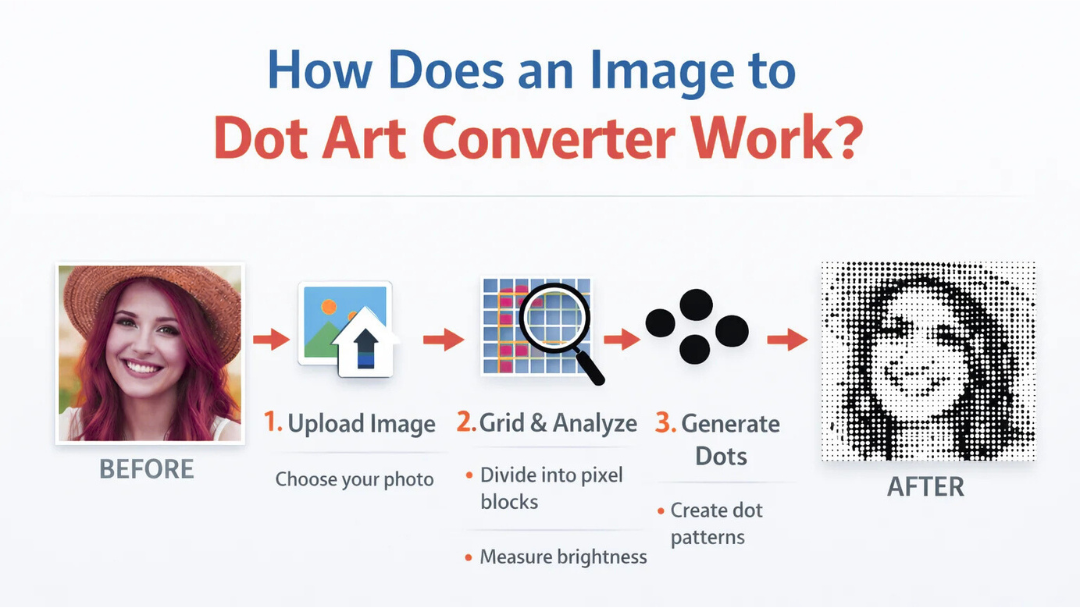
How Does an Image to Dot Art Converter Work?
An image to dot art converter works by analyzing the pixels of an image and transforming them into a pattern made entirely of dots. Instead of displaying full colors and smooth details, the converter recreates the image using small circular points arranged in a grid.
In simple terms, it takes a normal picture and rebuilds it using only dots — while keeping the overall shape and shading recognizable.
But behind this simple idea, there is smart image processing happening. Let’s break it down step by step.
What Is Dot Art?
Dot art (sometimes called pointillism in traditional art) is a style where an image is created using small dots instead of brush strokes or solid shapes.
In digital form:
- Each dot represents a group of pixels
- Dot size can represent brightness
- Dot spacing can affect detail level
The result looks artistic, stylized, and visually interesting.
Step-by-Step: How an Image to Dot Art Converter Works
1. The Image Is Uploaded
When you upload an image to a dot art converter, the tool reads the image file and extracts pixel data.
Every image is made of:
- Pixels
- Colors
- Brightness values
- Contrast information
The converter needs this information to recreate the image.
2. The Image Is Resized Into a Grid
The tool divides the image into a grid of small square sections.
For example:
- A 1000px image might be divided into 100×100 small blocks
- Each block represents one dot
This step determines how detailed the dot art will be.
More blocks = more detail
Fewer blocks = more abstract look
3. Brightness and Color Are Measured
For each grid section, the converter calculates:
- Average brightness
- Average color value
Instead of keeping every pixel, it simplifies the information into a single value per block.
4. Dots Are Generated
Now the real transformation begins.
The converter replaces each grid block with a dot:
- Darker areas = larger or darker dots
- Lighter areas = smaller or lighter dots
This creates the illusion of shading and depth.
The human eye blends these dots together and still recognizes the original image.
How Dot Size Affects the Final Image
Dot art converters often allow control over:
- Dot size
- Dot spacing
- Resolution
- Background color
Smaller dots:
- Increase detail
- Make the image clearer
Larger dots:
- Create a stronger artistic effect
- Make the image more abstract
This flexibility makes dot art useful for design, printing, and creative projects.
The Math Behind an Image to Dot Art Converter
Although it looks simple, there is real calculation happening behind the scenes.
The converter uses:
- Pixel averaging
- Brightness normalization
- Grid mapping
- Canvas rendering
But it does NOT require heavy AI or deep learning. The process is efficient and fast because it relies on structured image data, not complex analysis.
That’s why tools like Starrayto’s Image to Dot Art Converter can generate results instantly in your browser.
Why Image to Dot Art Converters Are Fast
The process is fast because:
- Images are processed in memory
- Pixel blocks are calculated once
- Rendering dots is lightweight
- No large databases are required
Unlike AI image tools, a dot art converter works purely on visual transformation.
Common Uses of Image to Dot Art Converters
People use dot art generators for:
- Creative design projects
- Social media graphics
- Posters and prints
- Logo experimentation
- Profile pictures
- NFT-style artwork
- Pattern design
Because the output is minimal and artistic, it works well in modern design trends.
How Starrayto Image to Dot Art Converter Works
The Starrayto Image to Dot Art Converter is built to be:
- Fast
- Simple
- Browser-based
- No login required
- Adjustable for different dot sizes
When you upload an image on:
The tool:
- Reads your image
- Breaks it into a grid
- Calculates brightness values
- Replaces each block with dots
- Displays the dot art instantly
Everything happens inside your browser, so your image is processed quickly and efficiently.
Does Using a Dot Art Converter Affect Image Quality?
Yes — but intentionally.
The tool simplifies the image:
- Reduces fine detail
- Converts gradients into dot patterns
- Creates stylized visuals
It’s not meant to preserve realism — it’s meant to create artistic transformation.
How Resolution Impacts Dot Art Results
Higher resolution images:
- Allow more detailed dot mapping
- Create smoother dot transitions
Lower resolution images:
- Produce chunkier dot art
- Look more abstract
For best results:
- Use clear, well-lit images
- Avoid blurry or low-quality pictures (If you have a any low quality images please do enhance it using our Free Image Enhancer and then upload it on our Image to Dot Art Converter.
Final Thoughts: How Does an Image to Dot Art Converter Work?
An image to dot art converter works by:
- Dividing an image into a grid
- Measuring brightness and color in each section
- Replacing each section with a dot
- Adjusting dot size to recreate shading
It transforms normal images into clean, artistic dot-based visuals using structured pixel calculations.
If you want to try it yourself, the Starrayto Image to Dot Art Converter lets you upload an image and generate dot art instantly — no complicated steps required.
