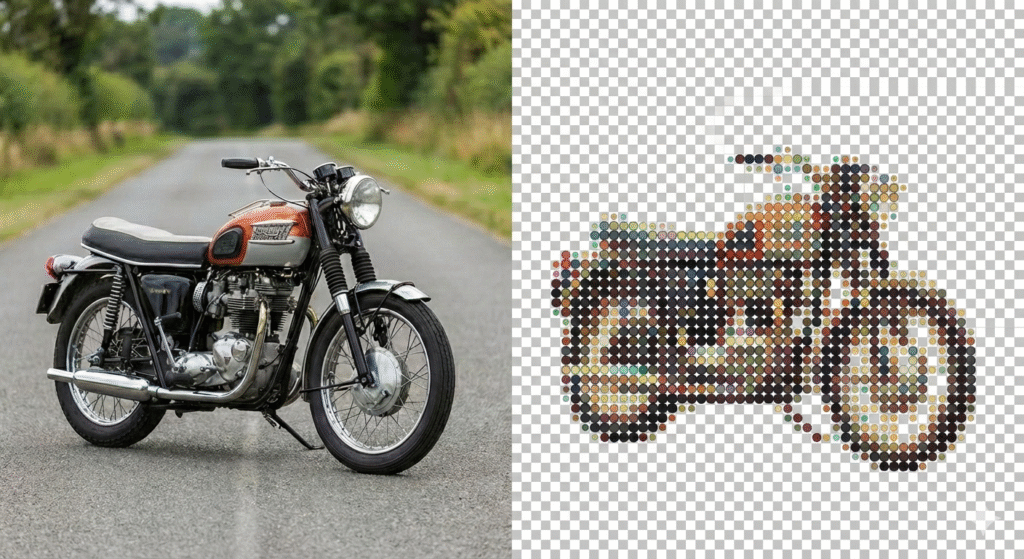
Convert images into dot art instantly. Perfect for social media comments and chats.
Dot Art Generator
Text Controls
Width25
Threshold100
Lower = More dots, Higher = Clean noise.
Adjustments
Contrast0
Brightness0
25 chars wide
Upload An Image
Drag and drop or click to browse. Supports PNG, JPG, WebP.
Check threshold settings
Drop Image Here
How to Convert Image to Dot Art
STEPS:
Upload Your Image
Upload any image you want to convert into dot art. The tool supports common image formats and works instantly without sign-up.
Dot Art Processing
Our tool automatically converts your image into dot-style art while preserving the overall shape and details. No manual settings required.
Copy Dot Art
Once the dot art is generated, copy it directly for social media comments and chats, or download it for later use.
Why Use an Image to Dot Art Converter?
Image to Dot Art conversion lets you turn normal images into creative dot-style text art that works perfectly in social media comments, chats, and messaging platforms. It’s fun, lightweight, and instantly eye-catching.
Express Creatively in Comments
Dot art images stand out in comment sections and chats, helping you express emotions, reactions, or creativity in a unique way.
Works Across All Platforms
Dot art can be copied and pasted easily into WhatsApp, Instagram, Telegram, YouTube comments, and more — no formatting issues.
No Design Skills Needed
Just upload an image and convert it instantly. No editing, no tools, and no experience required.
What Sets Our Image to Dot Art Converter Apart
Starrayto Image to Dot Art Converter is designed to be fast, simple, and fun to use. It instantly converts images into dot-style art that works perfectly for social media comments, chats, and messaging platforms. No sign-up, no watermark, and no technical knowledge required — just upload and convert.
Instant Conversion
Upload an image and get dot art in seconds with automatic processing.
Easy Copy & Share
Copy the generated dot art directly and paste it into WhatsApp, Instagram, Telegram, or comment sections.
Works on All Devices
Fully compatible with Android, iOS, Windows, Mac, and Linux — works in any modern browser.
How Resolution Impacts Dot Art Results
Higher resolution images:
Allow more detailed dot mapping
Create smoother dot transitions
Lower resolution images:
Produce chunkier dot art
Look more abstract
For best results:
Use clear, well-lit images
Avoid blurry or low-quality pictures (If you have a any low quality images please do enhance it using our Free Image Enhancer and then upload it on our Image to Dot Art Converter.
%
Free to Use
K+
Images Converted
K+
Happy Users
Wait Time
Image to Dot Art Converter Frequently Asked Questions (FAQ)
What is an Image to Dot Art Converter?
An Image to Dot Art Converter transforms regular images into dot-style text art that can be copied and shared in social media comments, chats, and messaging platforms.
Is this Image to Dot Art Converter free to use?
Yes. The tool is 100% free with no sign-up, no hidden charges, and no watermarks.
Which image formats are supported?
You can upload common image formats such as JPG, JPEG, and PNG.
Can I use the dot art on social media and chat apps?
Absolutely. The generated dot art works perfectly on WhatsApp, Instagram, Telegram, YouTube comments, and other chat platforms.
Do I need to install any software?
No installation is required. The tool works entirely online in your browser.
Does this tool work on mobile devices?
Yes. It is fully compatible with Android, iOS, Windows, Mac, and Linux devices.
Is my uploaded image stored or shared?
No. Your images are processed instantly and are not stored or shared.
Is there any limit onusage?
No usage limits. You can convert as many images as you want.